Table of Contents
Seller Profile Setup
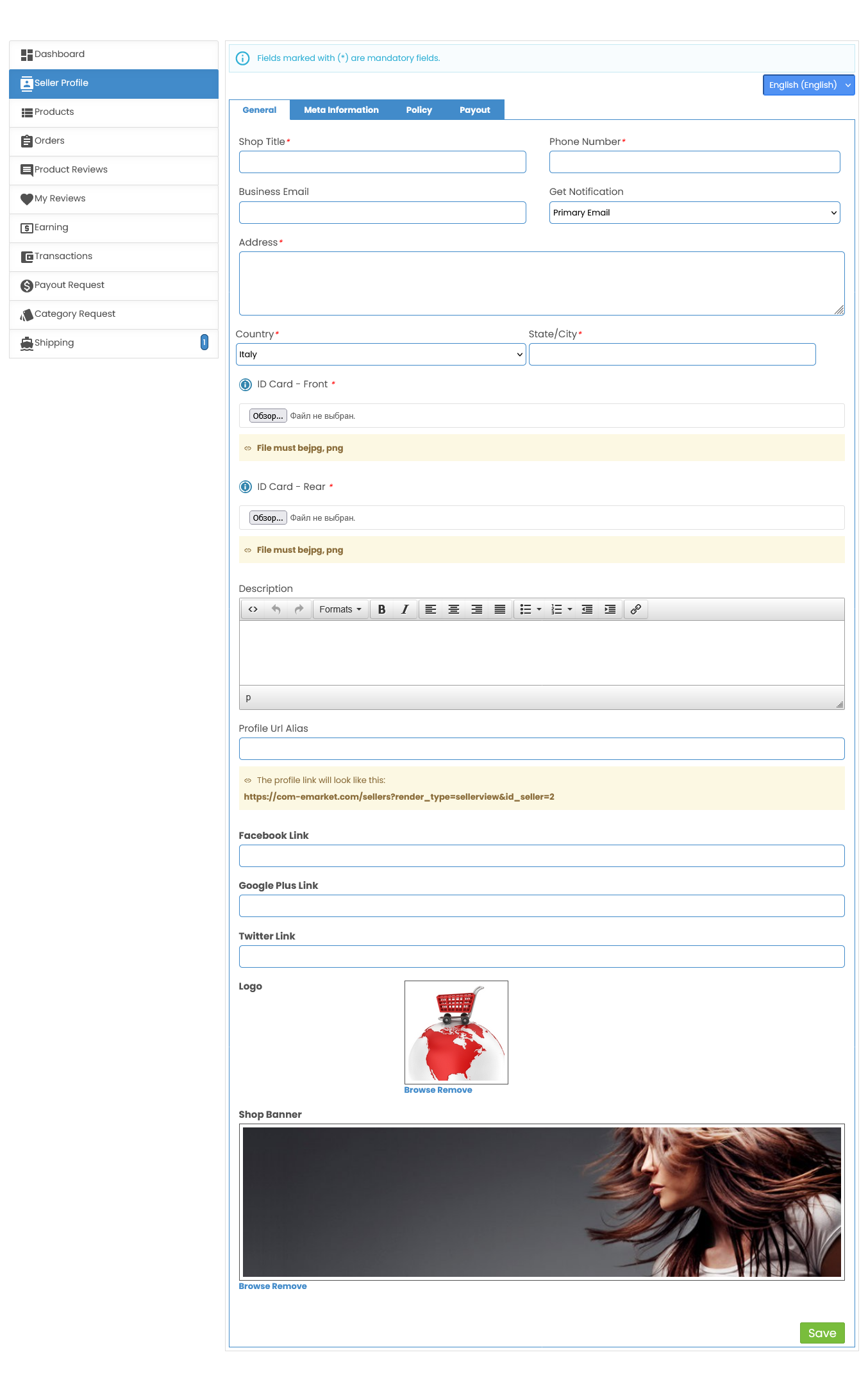
In the Seller Profile section, you can complete and personalize your shop information. Here are the fields you'll need to fill out to ensure a fully set-up seller profile:
General Information
- Shop Title
Enter the name of your shop as you want it to appear to customers.
- Phone Number
Provide a valid contact number. This is mandatory.
- Business Email
Enter the email address associated with your business.
- Get Notification
Choose where you’d like to receive notifications — your primary email or a backup.
Address Information
- Address
Enter the physical address of your business location.
- Country and State/City
Select your country and enter your city to verify location information.
ID Verification
- ID Card Number
Provide your ID card number for verification purposes.
- Scan of Your ID Card
Upload the front and back images of your ID card (accepted formats: .jpeg, .jpg, .pdf).
Profile Description
- Description
Write a brief introduction to your shop. Share what makes your store unique, your mission, or any details that will appeal to customers.
Social Media Links (Optional)
- Add links to your social media accounts (e.g., Facebook, Google Plus, Twitter) to help customers connect with you.
Profile URL Alias
- Customize your shop profile link for easy sharing.
This will appear as a unique URL for your store.
Logo and Shop Banner
- Logo
Upload your shop logo (recommended size: 80 × 180 px) to make your brand recognizable.
- Shop Banner
Add a banner to represent your store (recommended size: 800 × 250 px).
This helps make a strong visual impression on visitors.
Once all required fields are completed, click Save to update your profile. Verify all information before saving, as this will be visible to customers on ComeMarket.
 Need more help? Use the menu
  at the top to explore other topics.
To return to the trading platform, follow this link ↩ Go to Marketplace ComeMarket