Table of Contents
Transaction History Section Guide
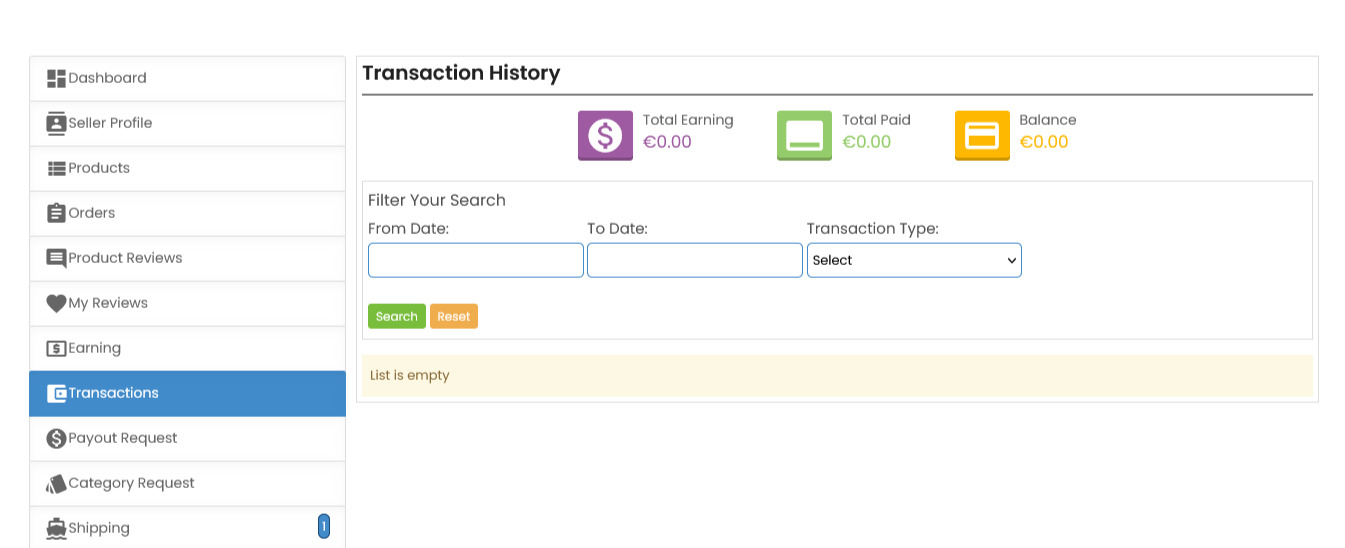
The Transaction History section provides a detailed overview of all financial transactions associated with your ComeMarket seller account. Here’s how to navigate this section:
Overview of Key Financial Metrics
At the top, you’ll see a summary of your financial data:
- Total Earning — the total amount earned through sales.
- Total Paid — the total amount you have received in payouts.
- Balance — the remaining balance available for payout.
Filtering Transactions
You can filter the transaction history to find specific records:
- From Date and To Date — set a date range to view transactions within a specific period.
- Transaction Type — use the dropdown to select specific transaction types, such as
sales,refunds, orpayouts.
Search and Reset
- After selecting your filters, click the Search button to display the relevant transactions.
- Use the Reset button to clear all filters and view the full transaction history.
Note
If the list is empty, it means no transaction records are available for the selected filters or date range.
 Need more help? Use the menu
  at the top to explore other topics.
To return to the trading platform, follow this link ↩ Go to Marketplace ComeMarket